
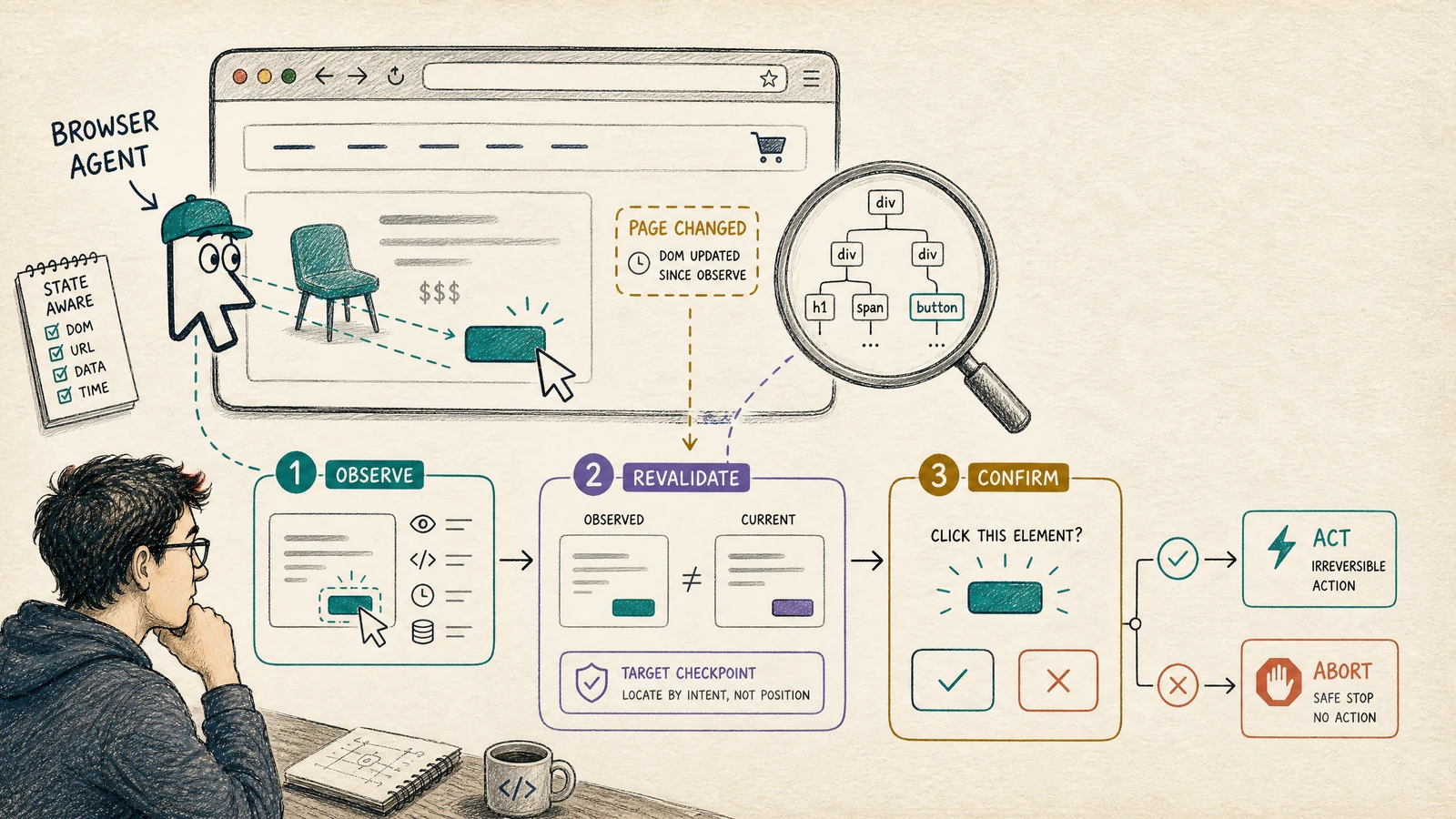
The browser agent was not confused by the button. It was confused by time.
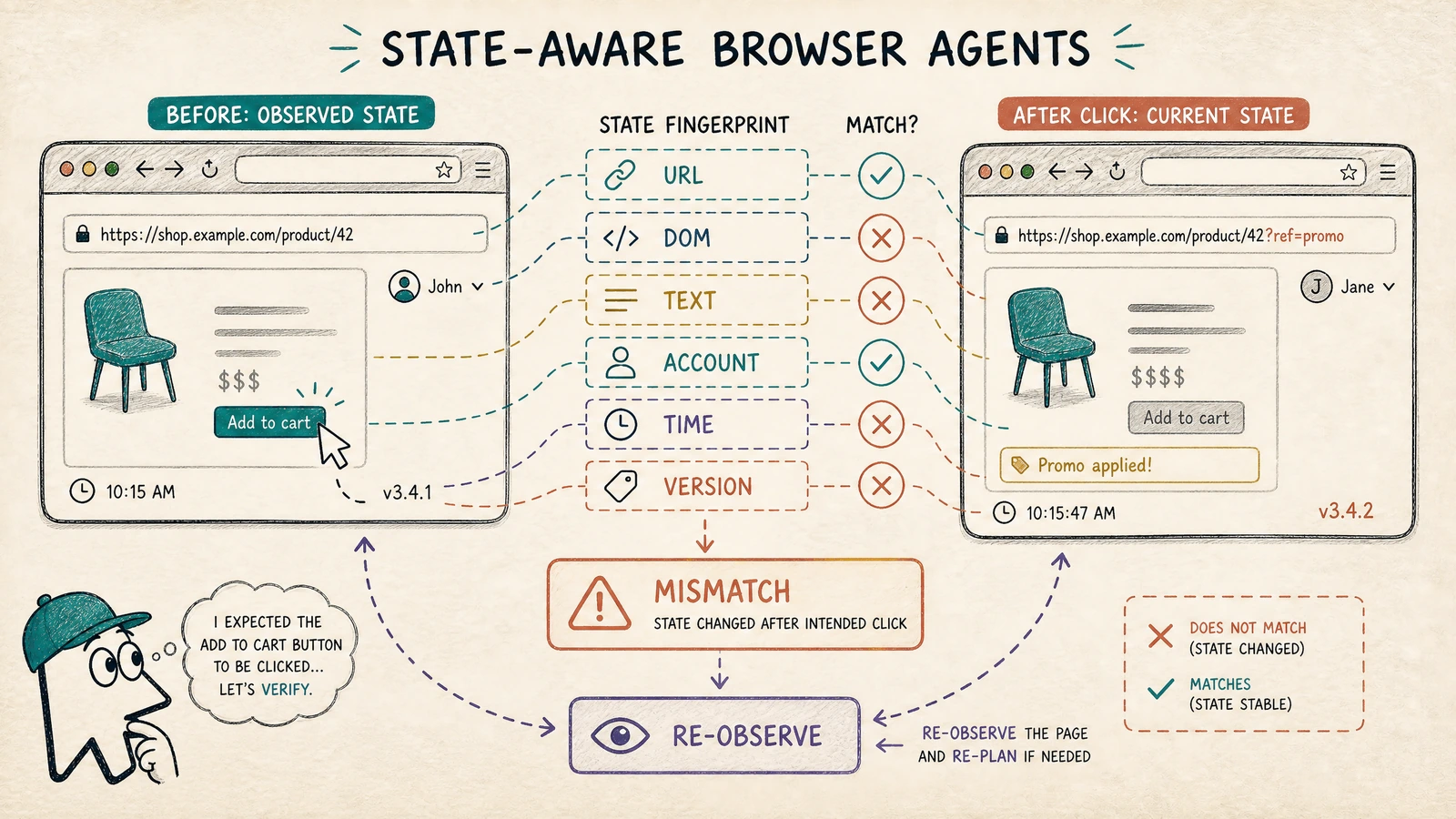
At 10:15:00, it inspected an order page and found an “Add to cart” button for the product the user had named. At 10:15:47, it clicked the same coordinate. In between, the page had refreshed, the signed-in account had changed, and a promotion banner had shifted the layout. The click was real. The target was not.
Nothing crashed. The browser returned a successful event. The agent reported that the item had been added. The user later discovered that the action had happened in a different account.
This is the failure mode that makes browser agents different from ordinary API tool callers. An API request usually carries a structured target and a server-side contract. A browser agent acts on a world that can change between observation and action: the DOM mutates, a modal opens, a session expires, a price changes, an A/B test swaps labels, or another person edits the same record.
The thesis: A browser action is safe only when the state that justified it still matches the state in which it will execute. Observe, fingerprint, revalidate, then act. If the fingerprint is stale, stop instead of guessing.
Realistic web-agent benchmarks such as WebArena are useful precisely because they evaluate agents in functional environments with multi-step tasks, not only isolated text responses. Production systems need one more layer: they must also prove that the page and authority context remained stable before an irreversible click.
A screenshot is an observation, not a contract
The easiest browser-agent implementation is a loop: take a screenshot or read the DOM, ask the model what to click, execute the click, and repeat. The loop works in a demo because the environment is quiet. Production web applications are not quiet.
A browser observation should be treated as a versioned fact with a limited lifetime. It says: “At this moment, under this URL, account, page version, and visible state, this target appeared to represent the user’s intent.” It does not say that the target will remain valid after another network request.
| Part of browser state | What can change | Why the agent should care |
|---|---|---|
| URL and route | Redirect, query parameter, tenant path | The same button may mutate a different resource |
| DOM target | Re-render, reorder, virtualized list | A coordinate or index can point somewhere else |
| Visible text | Localization, experiment, status update | The semantic meaning of the control can change |
| Account and role | Session expiry, account switch, impersonation | Authority may no longer match the original request |
| Time and freshness | Price, stock, token, approval window | The action may be valid only for a short interval |
| Page or API version | Deployment, feature flag, stale cache | The same selector may map to a different behavior |
The state fingerprint need not hash the entire page. A full-page hash is noisy and often creates false mismatches. Instead, choose fields that explain why the action was allowed: route, authenticated principal, target identity, relevant text, resource version, and freshness timestamp.
type BrowserObservation = {
  url: string;
  principalId: string;
  target: {
    role: string;
    accessibleName: string;
    resourceId?: string;
  };
  relevantText: string[];
  pageVersion?: string;
  observedAt: string;
};

type StateFingerprint = {
  url: string;
  principalId: string;
  targetKey: string;
  textHash: string;
  pageVersion?: string;
  observedAt: string;
};
The fingerprint is not a security boundary by itself. It is a revalidation input. The execution layer still needs authorization and an action policy. A matching fingerprint says “the observed target still looks like the intended target”; it does not say “the agent is allowed to submit this form.”
Locate by intent, not by position
Coordinates and ordinal indexes are attractive because they are simple. They are also fragile. A browser agent that says “click the third button” is encoding layout, not intent. Even a CSS selector can be too weak if it identifies a generic button shared by several records.
A better target description combines a semantic role, accessible name, nearby resource identity, and expected effect. For example: “the button named Add to cart inside the card whose product ID is 42.” The agent should also record what it expects to observe after the action, such as a cart count increment or a server-confirmed line item.
type ActionIntent = {
  kind: "click" | "fill" | "select" | "submit" | "delete";
  resourceId: string;
  expectedControl: {
    role: string;
    name: string;
  };
  expectedEffect: {
    event: string;
    resourceId: string;
  };
  reversibility: "reversible" | "irreversible";
};

function targetStillMatches(
  intent: ActionIntent,
  current: BrowserObservation,
): boolean {
  return (
    current.target.resourceId === intent.resourceId &&
    current.target.role === intent.expectedControl.role &&
    current.target.accessibleName === intent.expectedControl.name
  );
}
This is not an argument for forcing every web application into a perfect accessibility tree. It is an argument for giving the agent a richer target contract when the action matters. If the only available locator is a pixel coordinate, the system should classify the action as high uncertainty and require a stronger confirmation path.
Separate reversible exploration from irreversible mutation
Browser agents are good at exploration: opening a page, reading a policy, comparing products, filtering a list, or preparing a draft. They become dangerous when exploration and mutation share the same unconstrained action loop.
Classify actions by their effect on the world. Reading a page is usually reversible. Editing a draft may be recoverable. Sending an email, submitting a payment, deleting a record, or changing access is not. The browser agent should move through an explicit boundary before the irreversible group.
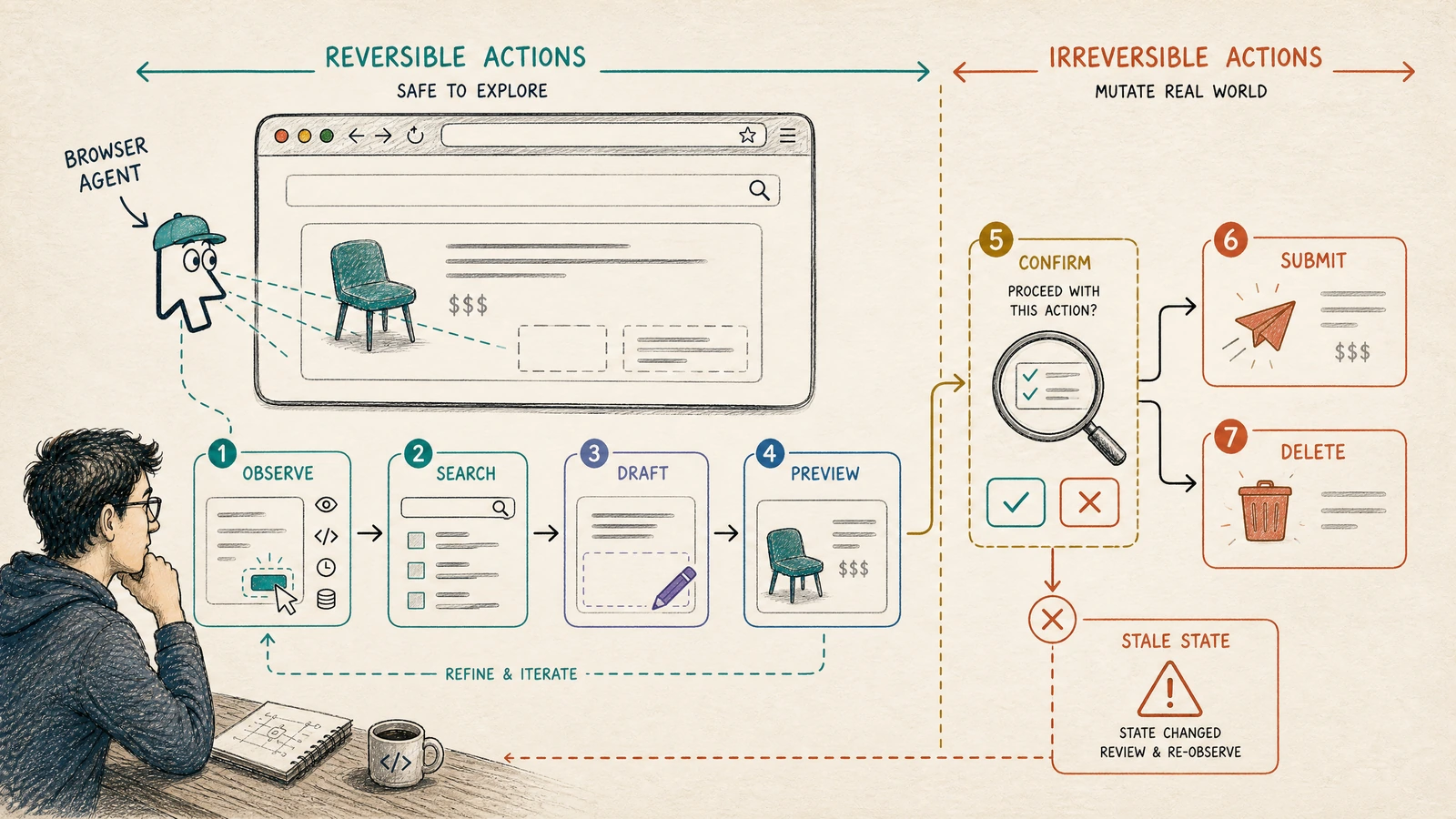
| Action class | Examples | Default control |
|---|---|---|
| Observe | Read page, inspect status, collect metadata | Allow with normal session policy |
| Explore | Search, filter, open detail, compare | Allow with rate and navigation limits |
| Prepare | Fill draft, stage selection, preview | Require target and field revalidation |
| Commit | Submit, purchase, send, publish | Fresh state plus confirmation or policy proof |
| Destruct | Delete, revoke, cancel, overwrite | Fresh state, explicit confirmation, audit record |
The confirmation should show the effect in user language, not the agent’s internal locator. “Submit a refund for order 42 in the Finance account” is meaningful. “Click button:nth-child(3)” is not. If the principal, resource, amount, destination, or irreversible effect changes between preview and commit, the confirmation is invalid and must be requested again.
A browser action is a small transaction
The browser does not give us database transactions across the page, the network, and the user’s intent. We can still design a transactional boundary around an action:
- Observe the current state.
- Resolve the target by intent and resource identity.
- Record a short-lived fingerprint.
- Prepare the action without committing it when possible.
- Re-observe immediately before the irreversible step.
- Compare the relevant fingerprint fields.
- Execute through the allowed browser capability.
- Verify the effect using a trusted result, not the click event.
A click event means the browser accepted an input. It does not mean the server committed the intended mutation. After a submit, verify the resulting resource, status, or confirmation message. If verification is impossible, report “could not confirm” rather than “done.”
The compare operation should be strict for high-risk fields and tolerant for harmless changes. A timestamp changing by a few seconds may be expected; an account ID changing is never harmless. A marketing banner changing may not matter for a read, but a price change matters before purchase.
type Risk = "low" | "medium" | "high";

function needsRevalidation(
  before: StateFingerprint,
  after: StateFingerprint,
  risk: Risk,
): boolean {
  if (before.principalId !== after.principalId) return true;
  if (before.url !== after.url) return true;
  if (before.targetKey !== after.targetKey) return true;
  if (risk === "high" && before.textHash !== after.textHash) return true;
  if (risk === "high" && before.pageVersion !== after.pageVersion) return true;
  return false;
}
Stale state should produce a safe stop
When the fingerprint does not match, the agent has three tempting options: click anyway, search for a similar target, or ask the model to improvise. All three can be acceptable only inside a bounded recovery policy. For irreversible actions, the default should be stop, re-observe, and re-plan.
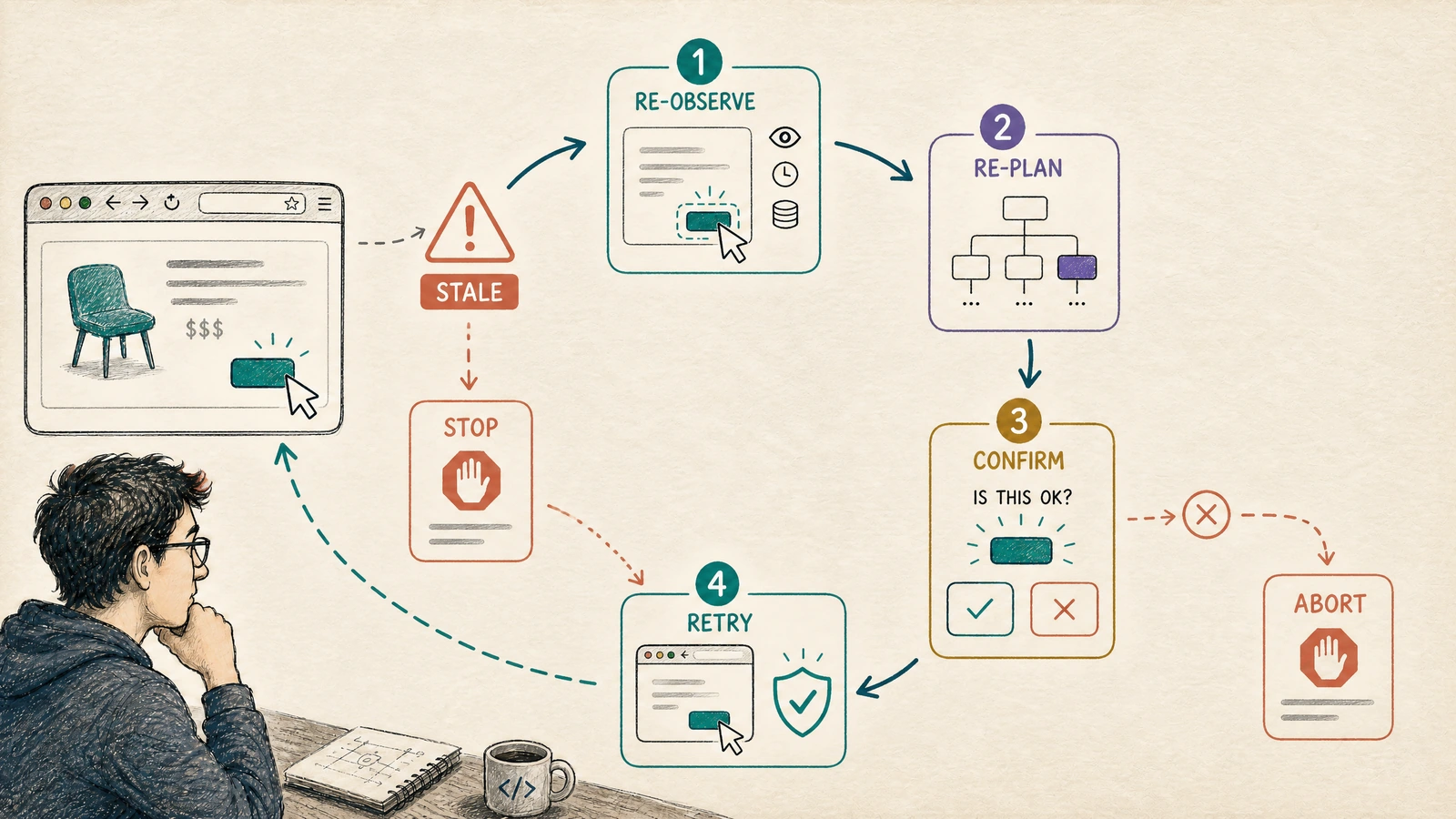
The recovery loop must not silently reuse the old plan. A new page may show a different account, a different price, or a different object. Re-planning from the new state is a new decision. If the system cannot explain why the new target is equivalent to the old intent, it should ask the user or abort.
This is also where loop budgets matter. A stale page that causes repeated re-observation can become a denial-of-service against the user or the website. Set limits for navigation steps, refreshes, retries, and time spent in recovery. When the budget is exhausted, hand off with a concise explanation.
Sessions and authority are part of page state
A browser agent inherits authority from a session, but the session is not a static fact. Tokens expire. Tabs share cookies. Users switch accounts. A support operator may open an elevated view in one tab while the agent continues in another. If the agent records only the URL and DOM, it can act in the wrong authority context.
The browser capability should expose a stable principal identifier and a session version to the action policy. Before a sensitive action, verify that the principal still matches the original request and that the session has not crossed an elevation boundary. Do not let the model decide that a new account is “probably fine.”
A useful rule is: authority changes invalidate the plan. The system may continue reading after a session refresh, but it should not carry an old plan across a principal change without explicit re-authorization.
Evaluate the environment outcome, not the transcript
A fluent transcript can hide a failed browser task. The agent may say “I updated the address” while the form validation error remained below the fold. It may say “the order is cancelled” after a click that only opened a confirmation modal. Evaluation must inspect the final environment state, not only the text the model produced.
For each task, record whether the intended resource changed, whether the change was authorized, whether the user was informed accurately, and how many stale-state recoveries occurred. Slice by browser, site, account type, page version, action risk, and interruption source.
| Metric | What it reveals | Bad interpretation to avoid |
|---|---|---|
| Intended-state success | Whether the requested mutation actually happened | Treating click success as task success |
| Wrong-target rate | Whether the agent affected the wrong resource | Hiding it inside aggregate pass rate |
| Revalidation stop rate | How often the world changed before action | Assuming every stop is an agent failure |
| Confirmation burden | How often users must re-approve | Optimizing away necessary safety |
| Recovery loop count | Whether a site is unstable or the locator is weak | Blaming the model without site context |
| Side-effect leakage | Whether exploratory steps mutated state | Treating read actions as automatically safe |
WebArena’s benchmark framing is a useful starting point for verifiable tasks, but production evaluation needs the application’s own state oracle and authorization model. Browser reliability is not just “did the agent finish?” It is “did the correct principal cause the correct state transition, and can we prove it?”
A practical rollout checklist
Before granting a browser agent write access, start with read-only tasks and record the state fields that would have prevented past errors. Add draft mode next. Introduce irreversible actions one capability at a time, with fresh-state checks and human confirmation. Keep a safe stop visible to both the user and operator.
The agent should expose a compact action ledger: intent, target resource, principal, observation time, fingerprint, policy decision, action result, and post-action verification. That ledger complements the folio’s existing work on tool contracts, agent identity, and failure UX without turning browser pages into an unbounded log stream.
The habit that prevents the expensive bug
Before every important click, ask one unglamorous question: what changed since I looked?
The answer may be “nothing material,” but the system should earn that answer through revalidation. Browser agents do not need to freeze the web. They need to respect that the web is alive. Pages update, people act, permissions change, and intent has a time boundary.
A reliable browser agent is therefore less like a macro recorder and more like a cautious operator: it locates by meaning, checks the principal, verifies the target, pauses at the action boundary, confirms the effect, and stops when the world no longer matches the plan.
Comments (0)