
Most on-premise AI proposals begin with a model name. Someone asks whether the company can run a 32B, 70B, or mixture-of-experts model, and the conversation immediately turns into a shopping list of GPUs.
That is the wrong first question.
The first question is what the system must do, how many requests it must serve at the same time, how long the prompts are, how much latency the user can tolerate, and what evidence is required before an answer becomes an accepted business outcome. Only after those constraints are clear should the team decide whether a small model, a medium model, or a larger quantized model belongs on the server.
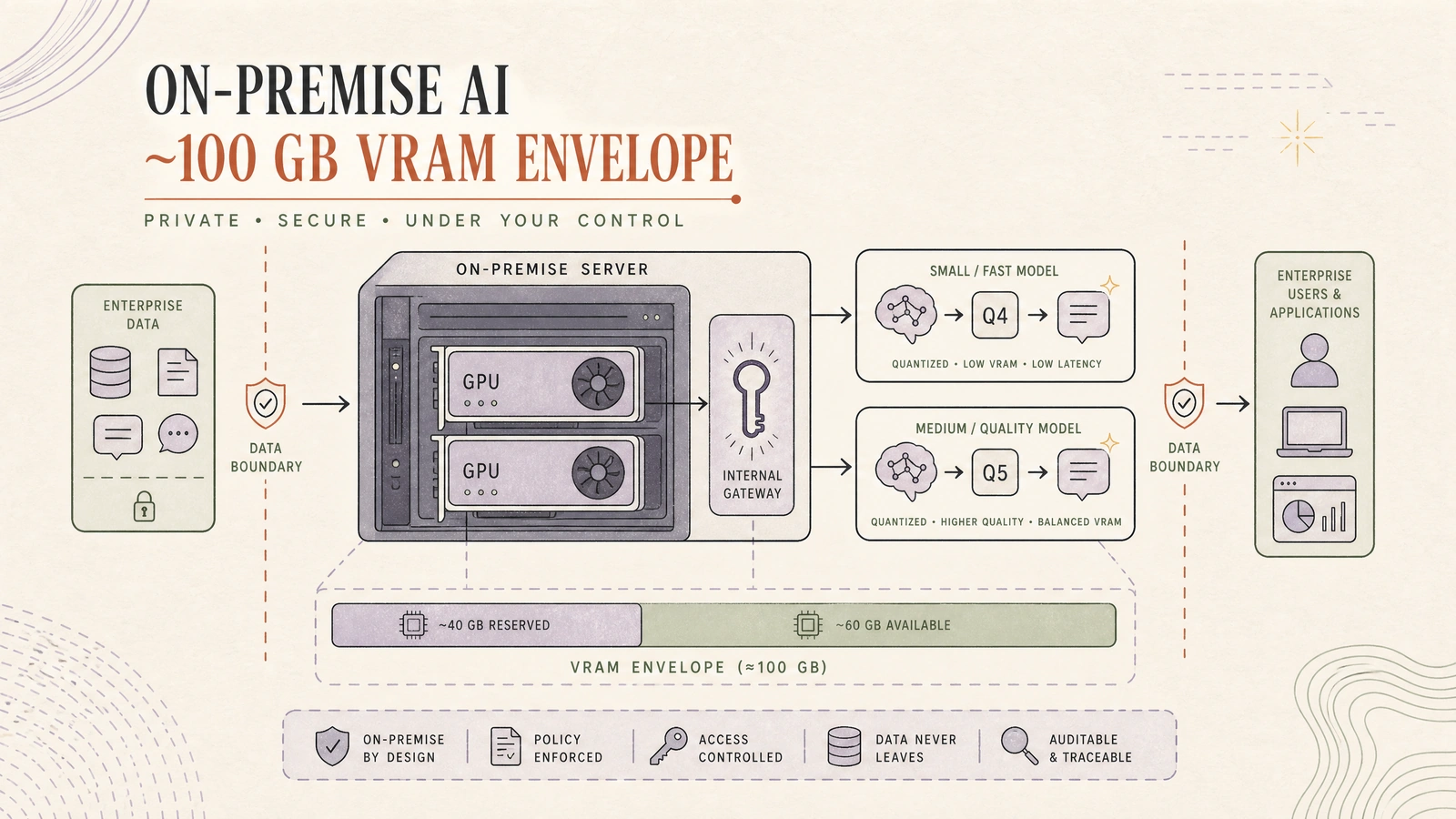
The thesis: approximately 100 GB of total VRAM is not a promise to run a 100-billion-parameter model. It is a capacity envelope that must be divided between weights, runtime buffers, KV cache, concurrency, and operational headroom. Production success comes from workload-first sizing, not from filling every byte with model weights.
This distinction matters because a model that loads successfully can still be unusable. It may have no room for a realistic context window, queue requests behind a single long prompt, OOM during graph capture, or produce acceptable answers too slowly when several departments use it at once. vLLM’s own deployment guidance separates the case where a model fits on one GPU from single-node tensor parallelism and multi-node combinations of tensor and pipeline parallelism. That is a serving decision, not merely a model-loading trick.
Start with the workload, not the parameter count
An enterprise workload is a distribution, not an average sentence. A help-desk classifier may receive thousands of short requests, while a contract assistant may receive a few long requests with retrieved evidence. A coding agent may generate a short patch but require several tool calls and verification passes. A private knowledge assistant may look cheap until retrieval adds a large context to every prompt.
Before selecting a model, write down five numbers for each workload: requests per minute, concurrent requests, input-token distribution, output-token distribution, and the latency target. Add a sixth number for quality: what makes a response accepted, rejected, or escalated?
| Workload | Typical model role | Capacity pressure | Quality gate |
|---|---|---|---|
| Classification and extraction | Small, fast model | Concurrency and queue time | Schema validity, field-level accuracy, abstention rate |
| Internal Q&A with retrieval | Small or medium model | Retrieved context and KV cache | Citation coverage, groundedness, refusal on missing evidence |
| Document drafting | Medium model | Output tokens and long prompts | Human acceptance, terminology, policy compliance |
| Coding and tool use | Medium or larger model | Multi-turn context and tool schemas | Tests, static checks, review acceptance |
| Sensitive decision support | Medium model plus verifier | Evidence, auditability, escalation | Policy checks and human approval |
A useful capacity contract is not “run model X.” It is closer to: “serve 40 concurrent short extraction requests at p95 time-to-first-token below two seconds, allow 8,192 input tokens, cap output at 512 tokens, and abstain when confidence or evidence is insufficient.” That contract can be tested. A model name alone cannot.
What 100 GB actually means
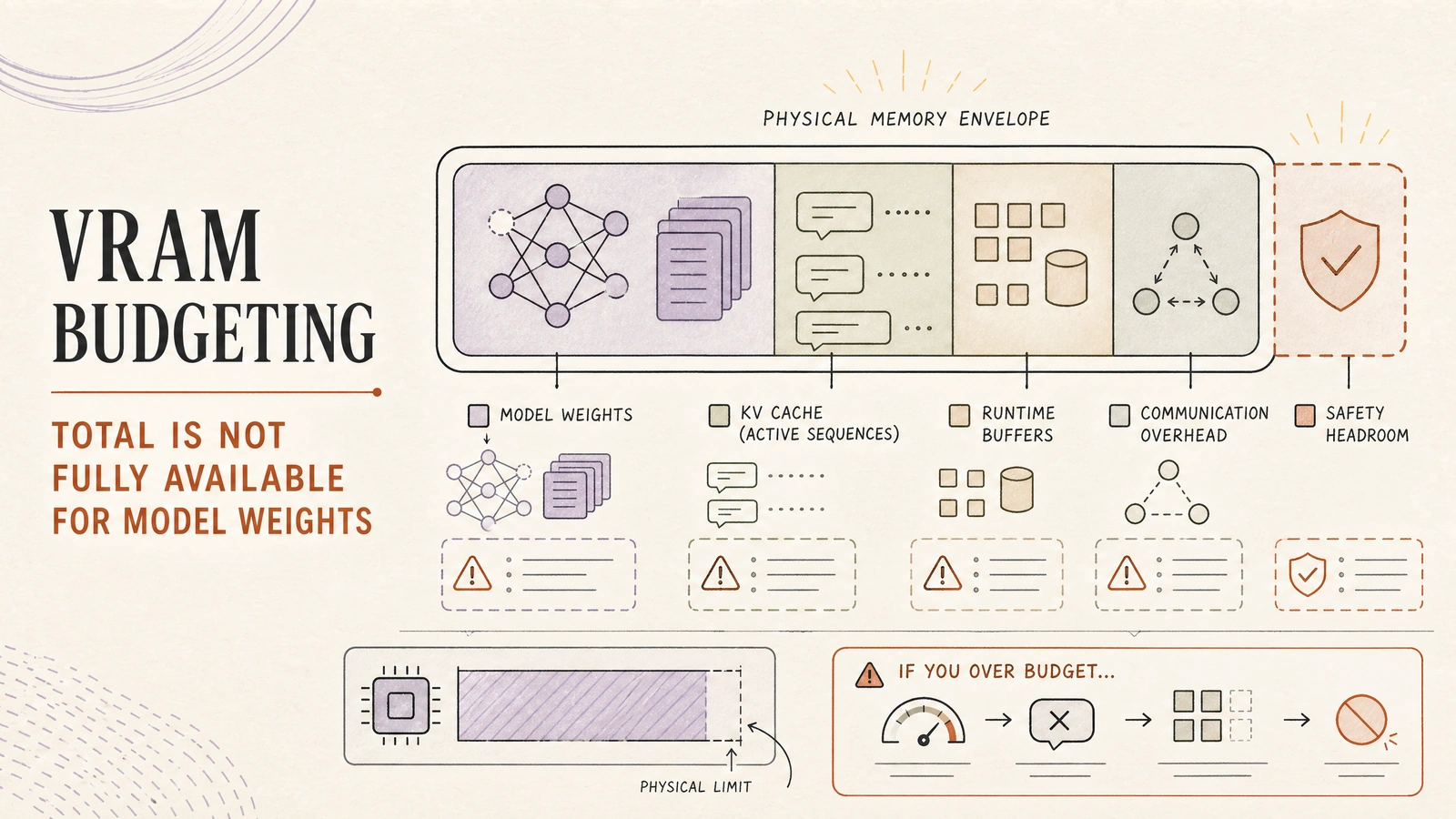
The phrase “100 GB VRAM” usually describes the sum of physical memory across GPUs. It does not describe the amount available to model weights. Some memory is consumed by the inference runtime, temporary allocations, CUDA graphs, communication buffers, allocator fragmentation, and the KV cache that stores attention state for active requests.
A practical planning equation is:
usable serving memory
= physical VRAM
  - runtime and framework reserve
  - communication and temporary buffers
  - safety headroom

memory available for weights and KV cache
= usable serving memory
For rough model selection, weight memory is approximately parameter count multiplied by bytes per weight. FP16 or BF16 is close to two bytes per parameter, INT8 is close to one byte, and INT4 is close to half a byte before scales, metadata, padding, and runtime overhead. Hugging Face describes quantization as storing weights at lower precision to reduce memory requirements while preserving as much accuracy as possible, and emphasizes that supported methods have different trade-offs and hardware requirements.
The arithmetic is useful for rejecting impossible plans. It is not accurate enough to approve a production capacity target.
| Model class | Approximate raw weight size | Plausible role inside a 100 GB envelope | Main risk |
|---|---|---|---|
| 7–8B at BF16/FP16 | 14–18 GB | High-volume classification, extraction, routing, short-form Q&A | Quality may be insufficient for complex tool use |
| 14–15B at BF16/FP16 | 28–34 GB | General internal assistant or structured generation | Long context and concurrency consume the remaining budget |
| 24B at INT4 | 14–18 GB before runtime overhead | Strong medium model on a single 48 GB-class GPU | Quantization quality and context budget must be measured |
| 30–32B at INT4 | 18–24 GB before runtime overhead | Medium reasoning, coding, or document workflows | Larger KV cache and output length can dominate memory |
| 70B at INT4 | 40–50 GB before runtime overhead | Specialist high-quality tier with multi-GPU serving | Two-GPU parallelism, lower concurrency, and interconnect become central |
The table is deliberately approximate. It excludes the KV cache, which grows with the number of active sequences, context length, layer count, and attention dimensions. vLLM reports the KV-cache capacity and an estimate of maximum concurrency from the configured sequence length; that is why max-model-len is a capacity control rather than just a user-facing feature toggle.
A team should therefore reserve memory before it chooses a quantization level. Filling a 48 GB card to 47.9 GB with weights may look efficient in a static model summary and fail as soon as the server admits a second long request.
A practical hardware interpretation
There are several ways to approach an approximately 100 GB envelope. A pair of 48 GB-class data-center or workstation GPUs gives 96 GB nominal VRAM. Two NVIDIA L40S cards are a natural example: NVIDIA lists the L40S at 350 W maximum power and reports FP32, FP16 Tensor Core, and FP8 Tensor Core performance figures on the product page. The important point is not the advertised FLOPS. It is that two cards provide either two independent serving slots or a shared tensor-parallel pool, depending on the workload.
An H100 SXM has 80 GB of memory and 3.35 TB/s memory bandwidth, while the H100 NVL is listed with 94 GB and 3.9 TB/s. One large GPU can be operationally simpler than two smaller cards when a model fits, but it does not automatically provide more total capacity, redundancy, or concurrency. A single-card design also creates a larger failure domain.
| Topology | Nominal memory | Best fit | What it does not solve |
|---|---|---|---|
| 2 × 48 GB-class GPUs | 96 GB | Two independent tiers, or one tensor-parallel replica | Memory is not automatically pooled; cross-GPU communication can limit latency |
| 1 × H100 SXM | 80 GB | Low-latency single-model serving with strong memory bandwidth | No GPU-level redundancy and less total memory than 96 GB |
| 1 × H100 NVL | 94 GB | A large single-GPU memory target with enterprise hardware | Still one logical serving slot unless the application multiplexes workloads |
| 4 × 24 GB GPUs | 96 GB | Existing workstation or lab inventory | More fragmentation, more communication, and less comfortable per-GPU headroom |
The two-GPU option is especially useful when the organization has two distinct workload tiers. One GPU can host a small always-on model for classification, extraction, routing, and fallback. The other can host a 14B, 24B, or 32B quantized model for harder generation. A router can send only the requests that need the larger model to the second tier, while admission control prevents long contexts from starving short operational tasks.
This is often more robust than running a single 70B model across both GPUs for every request. Tensor parallelism can make a model fit, but it also couples the health, scheduling, and latency of the two devices. Use it when the quality requirement justifies the coupling, not because the combined memory number looks attractive.
Choose a model ladder, not one model
An enterprise on-premise deployment should have a model ladder with explicit promotion rules. The small model is not a cheap version of the large model; it is a different service with a different contract.
A sensible first tier is a 7B–8B instruct model in BF16, FP16, or a carefully validated 8-bit format. It handles classification, extraction, routing, short summaries, and structured transformations. Its value is predictable latency and high concurrency. If the workload is mostly schema-constrained, a small model with good validation can outperform a larger model that is repeatedly retried because its output is difficult to parse.
The second tier is a 14B–32B model. Qwen3-14B is documented as a 14.8B-parameter model with 32,768 native context and validated extension to 131,072 tokens using YaRN; its model card identifies Apache-2.0 licensing and deployment paths for vLLM, SGLang, and llama.cpp. Mistral Small 3.1 24B is another representative medium model; its card identifies Apache-2.0 licensing and recommends vLLM for serving.
The second tier is where most enterprise teams should begin. It offers a meaningful quality step without forcing every request through multi-GPU model parallelism. Quantize it to INT4 or INT8 only after measuring the tasks that matter. A lower-bit model that loses the company’s terminology, tool-call discipline, or refusal behavior is not cheaper if it increases human review and retries.
The third tier is a larger quantized model, such as a 70B-class model, reserved for difficult requests. A 70B INT4 model may fit within two 48 GB-class GPUs on paper, but the operational contract is tighter.
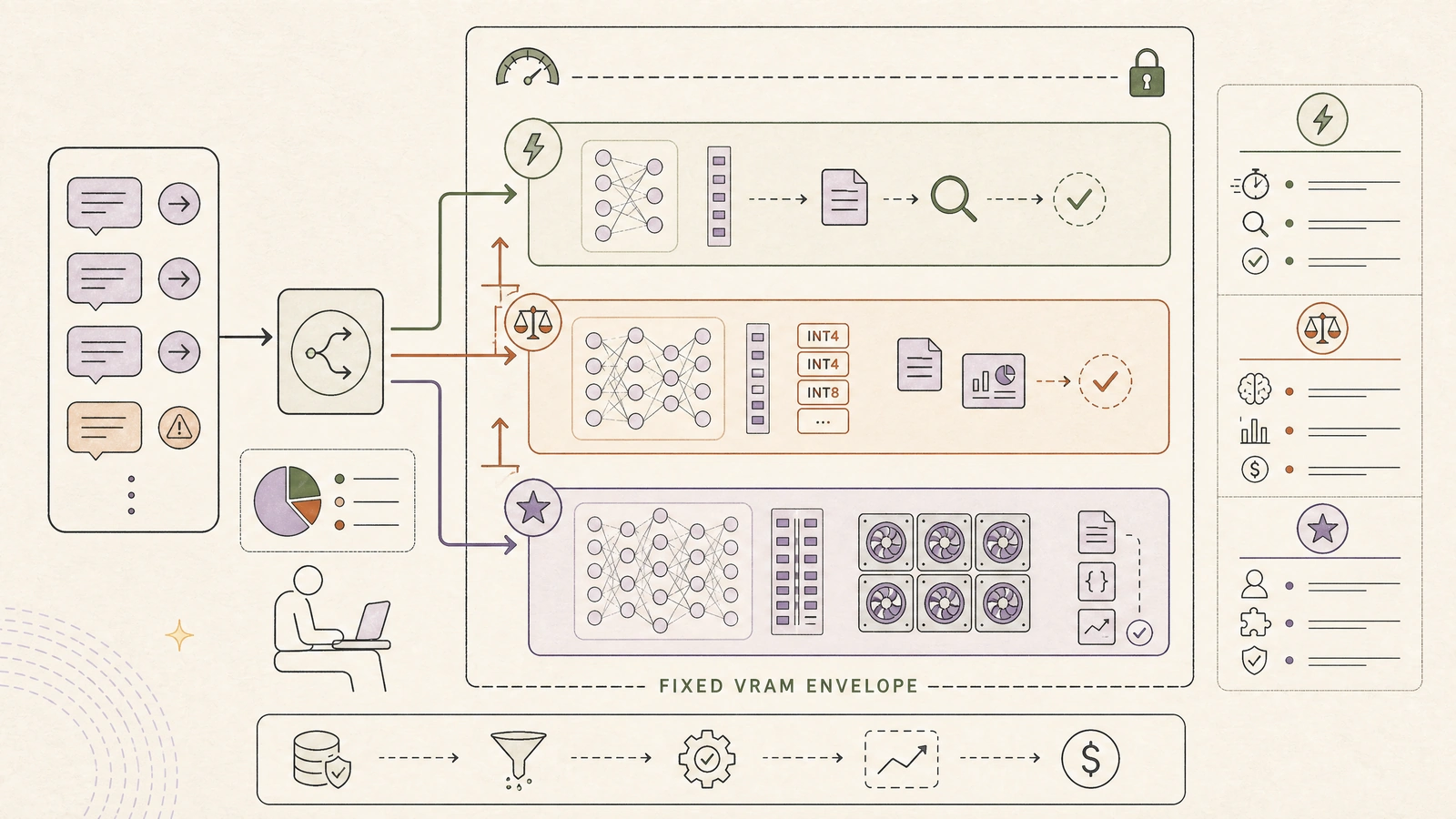
Long contexts, multiple concurrent sequences, and tensor-parallel communication can consume the margin quickly. Treat this tier as an exception path, not the default endpoint for every employee.
Quantization is a quality decision
Quantization should be selected by workload and verified by evaluation. FP16 or BF16 is the simplest baseline when the model fits. It usually offers the most predictable numerical behavior, but it consumes roughly twice the weight memory of INT8 and four times that of INT4 before overhead.
INT8 can be a useful compromise for a model that nearly fits in a single card or needs more KV-cache room. INT4 can make a 24B or 32B model practical on a 48 GB-class GPU, but the quality impact is not uniform. Tool selection, multilingual output, code generation, long-context retrieval, arithmetic, and refusal behavior can degrade differently.
AWQ and GPTQ are calibrated weight quantization approaches. Bitsandbytes provides an accessible path for 8-bit and 4-bit loading in compatible stacks. FP8 can be attractive on hardware and engines that support it well. None of these labels is a substitute for a benchmark with the target model, target tokenizer, target prompts, and target serving engine.
Build a small acceptance suite before quantizing:
| Test family | What to measure | Failure signal |
|---|---|---|
| Structured extraction | Exact-match fields and JSON validity | More repair loops or invalid schemas |
| Retrieval Q&A | Citation coverage and grounded answer rate | Fluent answers unsupported by retrieved evidence |
| Tool use | Correct tool choice and argument validity | Wrong tools, missing fields, or unsafe arguments |
| Coding | Tests passed and review acceptance | More regressions or manual correction |
| Safety and policy | Refusal and escalation behavior | Over-compliance, leakage, or silent uncertainty |
| Language quality | Terminology and bilingual consistency | Domain terms translated or normalized incorrectly |
Keep a full-precision or higher-precision reference for comparison. The result you want is not “the quantized model sounds similar.” It is “the quantized model meets the workload’s acceptance threshold while improving memory headroom or throughput.”
KV cache is the hidden capacity variable
Weights are static. KV cache is dynamic. Every active sequence stores attention state, and the amount grows as prompts and generated outputs get longer. A server that looks comfortable with one short request can become unstable when a retrieval pipeline adds 10,000 tokens or when a coding agent keeps a long tool history in context.
Set context limits by workload rather than exposing the model’s maximum context to every caller. A 128k-capable model does not mean the production gateway should admit 128k tokens. Long-context requests should receive a separate budget, queue, or model tier. Qwen3’s model card explicitly distinguishes native context from YaRN-scaled context, which is a useful reminder that extended context requires configuration and validation.
Track four signals together: GPU memory utilization, KV-cache utilization, active sequences, and queue wait. A rise in GPU memory without a rise in active sequences may indicate fragmentation or temporary buffers. A rise in queue wait with stable memory may indicate scheduler limits. An OOM after a long prompt is not solved by increasing the request timeout.
A practical admission policy is simple. Reject or downgrade requests that exceed the context budget, reserve capacity for short high-priority work, cap maximum output tokens, and route long documents to an asynchronous workflow. The policy should return a useful reason, not a generic 500 error.
Serving topology for a two-GPU envelope
A production topology can remain small without being simplistic:
enterprise applications
        |
identity, policy, audit gateway
        |
request classifier + model router
        |-------------------------------|
small-model pool                 medium-model pool
classification, extraction       14B–32B quantized
routing, fallback                vLLM or SGLang
        |                               |
validation + safety checks ---- shared observability
        |
accepted outcome / abstention / human escalation
Run one serving process per GPU when the model fits independently. Use tensor parallelism when a single model needs more memory than one card, and benchmark the communication path. vLLM documents tensor parallelism for single-node multi-GPU deployment and pipeline parallelism for models that exceed a node’s capacity.
Use an OpenAI-compatible internal API so applications do not become tightly coupled to the serving engine. Qwen3’s model card points to vLLM, SGLang, and llama.cpp as local or deployment options. The choice should depend on supported model architecture, batching behavior, observability, quantization path, and the team’s operational familiarity.
Do not let the router hide the evidence needed to operate the system. Propagate model ID, quantization format, prompt and output token counts, queue time, time to first token, inter-token latency, finish reason, safety decision, and outcome ID. The folio’s existing model-router and SLO articles are useful companions here: routing chooses a path, while the serving contract proves whether the path was healthy.
Enterprise controls belong in the first release
On-premise is not automatically secure. A GPU server can still leak data through logs, model caches, package downloads, shell access, debug endpoints, or an overly permissive administrator group.
The first release should define an outbound network policy, artifact provenance, model-license review, secrets boundary, audit retention, and patch process. Pin container and model versions. Record the exact quantization artifact and calibration set. Separate model download infrastructure from runtime serving where possible. Do not log raw prompts by default; use redacted traces and access-controlled replay for incidents.
Multi-tenancy needs more than a tenant header. Enforce tenant identity at the gateway, apply per-tenant concurrency and token budgets, isolate retrieval indexes, and make model outputs subject to the same authorization rules as the source data. A private model does not make an unauthorized answer acceptable.
Availability also changes on-premise. The team owns GPU failures, driver compatibility, disk pressure, temperature, power limits, firmware, and model artifact recovery. If there is only one server, document the failure mode honestly. A warm standby CPU path, a smaller fallback model, or a controlled degraded mode may be more useful than pretending that one box provides high availability.
Benchmark the system you will operate
Synthetic tokens-per-second numbers are not a capacity plan. Build a benchmark matrix from representative production traces with sensitive data removed. Include short and long prompts, single-turn and multi-turn conversations, tool schemas, retrieval payloads, structured output, and cancellation.
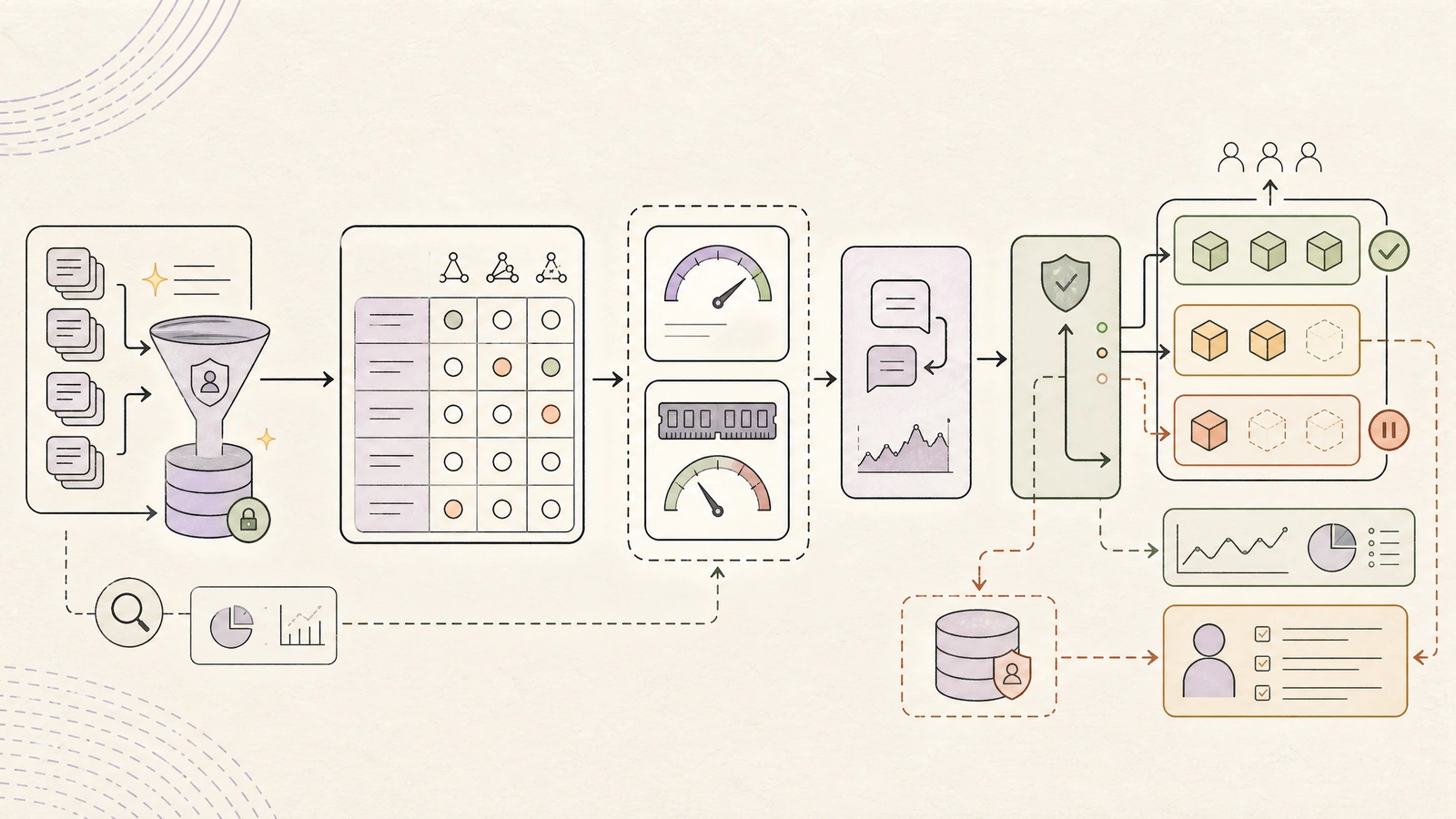
Measure time to first token, inter-token latency, end-to-end latency, throughput, queue wait, peak VRAM, KV-cache occupancy, error rate, OOM rate, and quality acceptance. Run at several concurrency levels. Repeat after changing quantization, context caps, batch limits, and model routing.
| Benchmark stage | Question answered | Release decision |
|---|---|---|
| Correctness baseline | Does the model meet the task contract before optimization? | Reject models that fail quality or policy gates |
| Memory fit | Does it load with runtime headroom and target context? | Reject configurations that require emergency memory settings |
| Saturation test | Where do p95 latency and queue wait become unacceptable? | Set concurrency and admission limits |
| Failure test | What happens during OOM, timeout, GPU loss, or invalid output? | Require fallback, retry, or abstention behavior |
| Replay test | Does the optimized model preserve representative outcomes? | Approve quantization and routing changes |
| Soak test | Does the service remain stable over hours or days? | Approve production rollout |
A good report has a decision at the end. For example: “The 24B INT4 tier meets p95 TTFT under four seconds at eight concurrent requests with 8k maximum context; the 32B tier is reserved for asynchronous document jobs; the 70B tier is not admitted because tensor-parallel p95 queue time violates the interactive SLO.” That is more valuable than a chart claiming 120 tokens per second in an empty server.
A rollout plan that fits enterprise reality
Start with one workload whose acceptance criteria are measurable and whose data boundary justifies on-premise placement. Freeze the model artifact, tokenizer, engine version, quantization format, prompt template, and evaluation set. Deploy behind an internal gateway with authentication, per-tenant limits, redacted observability, and a kill switch.
Run shadow traffic before switching user-visible responses. Compare the on-premise model with the existing path on quality, latency, cost, and failure recovery. Promote only the workload slices that pass the gate. Keep the small model available as a fallback, but do not silently downgrade a high-risk task; return an explicit escalation or human-review state when the fallback cannot meet the contract.
After launch, review capacity by workload rather than by GPU utilization alone. A GPU at 70 percent utilization can still have unacceptable queue latency, while a lower utilization can be healthy if the service has a large burst reserve. Revisit context caps and routing rules before buying more hardware. Many teams discover that prompt growth, duplicate retrieval, or unbounded tool history is the real capacity problem.
The decision framework
For most enterprises with approximately 100 GB total VRAM, the strongest first design is not “one enormous local model.” It is a two-tier platform: a small model for volume and control, and a medium quantized model for quality-sensitive work. Keep one GPU available for the small tier when possible, place the 14B–32B tier on the second card, and use multi-GPU serving only for requests whose quality requirement justifies its operational coupling.
Choose a larger quantized model only after the benchmark demonstrates that the medium tier cannot meet the task contract. If it must span GPUs, give it an explicit concurrency budget and a separate queue. Treat long context as a scarce resource. Measure outcomes, not just tokens. Preserve a higher-precision reference path for evaluation. The best on-premise system is not the one with the largest model that can be made to load; it is the one that delivers accepted business work predictably inside the company’s data, latency, and capacity boundaries.
References
[1] vLLM — Parallelism and Scaling
[2] Hugging Face Transformers — Quantization Overview
[3] NVIDIA — L40S GPU for AI and Graphics Performance
[5] Qwen — Qwen3-14B Model Card
[6] Mistral AI — Mistral Small 3.1 24B Instruct Model Card
[8] NVIDIA — TensorRT-LLM Overview
Comments (0)